Driving Theory Practice Questions From Your Own Handbook
Photograph a page of your driver handbook and Study Shot writes driving theory practice questions on it, explains each answer and saves the quiz to retake.
You can make driving theory practice questions from the page of the official handbook you are reading tonight, so every question is about your own rules. Photograph the page with Study Shot, a web app that writes a practice quiz from a photo of a page. It writes multiple-choice questions about that page, checks each answer and explains why the right answer is right. This post shows the steps, which handbook pages suit which level, how to check the questions, and a routine for working through the whole book.
Why quiz yourself from your own handbook
Ready-made question banks online can come from another country or state, with different signs, limits and rules. They can also be out of date, or skip the section you just read. A quiz made from your own handbook page has none of those problems: Study Shot writes questions only about what it can see on the page.
That also makes your mistakes easy to fix. When you miss a question, you know exactly where the answer is, because it is the page you just photographed. Check with your licensing authority which edition of the handbook is current and what the test covers, and study from that.
What you need before you start
- The current handbook. A printed copy, or a page on a screen you can photograph or screenshot.
- One page at a time. Study Shot's own photo guide says one page per quiz works best. A photo of two pages side by side makes the print smaller and splits the questions between them.
- A phone or computer with a web browser. Study Shot runs in the browser, and every screen needs a free account.
- A study shot left this month. Each quiz you make from a photo uses one, whatever its number of questions, level or language. Taking a quiz and retaking it use none.
For the photo, lay the page flat, use good light rather than the flash, and fill the frame. Study Shot takes JPEG, PNG, WebP and GIF photos up to 5 MB. There is no PDF upload, so for a handbook you read as a PDF, take a screenshot of one page and use Choose photo. Study Shot reads words, numbers, labels and diagrams, so a page of labelled signs works. Anything cut off at the edge or lost in glare does not make it into the quiz. The guide to taking a good photo of a page has more.
Step by step: driving theory practice questions from one page
Here is a worked example. Say tonight's page is the one on stopping distances.
- In your library, press Make a new quiz. Under 1 · Your page, press Take photo to use the camera, or Choose photo to pick a photo you already have.
- Check the photo in the frame. If it is blurry or cut off, press Retake photo.
- Under 2 · Level, leave Tiered on. It is a ladder: basic first, up to advanced.
- Under 3 · Language, check the language. The questions, answers and explanations are written in it.
- Under 4 · How many questions, pick 5, 10, 15 or 20. A page dense with numbers has enough in it for 15. With Tiered, the line under the numbers tells you how they split across the levels.
- Press Create questions. You see "Reading your page…", and writing the quiz can take up to a minute.
- Answer one question at a time. Each has four choices, A to D, and one right answer. Press Check answer and you see Correct! or Not quite., the correct answer and a short explanation. Press Continue; on the last question the button says Finish quiz.
- Read your results: a percentage and a grade, a score for each level, and Look at these again, which lists each question you missed with your answer and the right answer.
On a stopping distances page, a basic question might ask what a term on the page means. An intermediate one might ask how a wet road changes the distance the page gives. An advanced one might describe a situation the page does not show and ask what the rule means for it. If the app is new to you, the guide to making your first quiz walks through the same screens.
Which level suits which handbook page
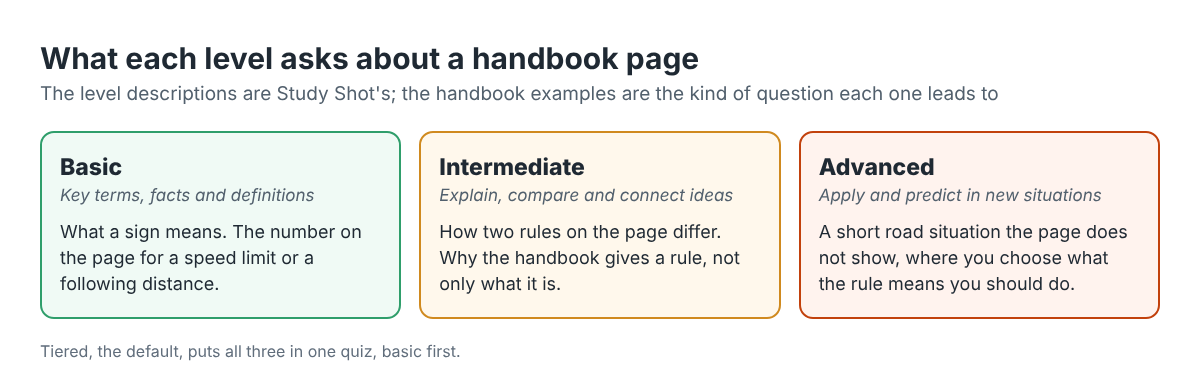
Study Shot writes questions at three levels. Basic checks key terms, facts and definitions. Intermediate asks you to explain, compare and connect ideas. Advanced asks you to apply and predict in new situations. Tiered, the default, puts all three in one quiz. Here is how they match the kinds of pages a driver handbook often has. These pairings are suggestions, not rules.
Road signs and markings
A page of signs is mostly facts: what each one means and what it tells you to do. Pick Basic. If the page is full, pick 20 questions so the quiz reaches more of the signs.
Who goes first
Pages on junctions, crossings and giving way are about using a rule in a situation, not reciting it. After a Tiered quiz, make a second quiz from the same photo at Advanced, which asks you to apply what the page says.
Numbers: distances, limits and penalties
Pages with numbers on them mix facts and reasons. Tiered works well: the basic questions check the numbers, and the higher levels check that you understand why they change. Where two penalties or limits sound alike, Intermediate asks you to compare them. The guide to levels and question counts explains each level.
Check every question against the handbook
An AI model writes the questions, and it can make mistakes. With road rules, a wrong fact matters, so build a quick check into every quiz:
- Read the explanation, even when you were right. If it does not match what your handbook says, the handbook wins.
- Press Show page. During a quiz it brings up your photo, so you can find the line the question came from.
- Watch for anything not on the page. If a question uses a rule or a number your page does not give, look it up in the handbook before you learn it.
- Report a question that looks wrong. Under every question is Report a problem with this question, with four reasons, including "The marked answer is wrong" and "It isn't on the page". Reporting does not change your score.
For more on where AI-written questions go wrong, read how accurate AI-written practice questions are.
A page-a-day routine with retakes
It is tempting to reread the handbook until it feels familiar. A study by Roediger and Karpicke (2006) is a warning about that feeling. Students read short passages, then either read them again or took recall tests on them, without feedback. On a test 5 minutes later, rereading did better. On tests 2 days and a week later, the students who had been tested remembered much more, even though rereading had made students more confident. The study used prose passages, not a driving test, but it suggests that a retake after a break tells you more than one more read.
Here is a routine built on that. It is a suggestion; fit it to the time you have before your test.
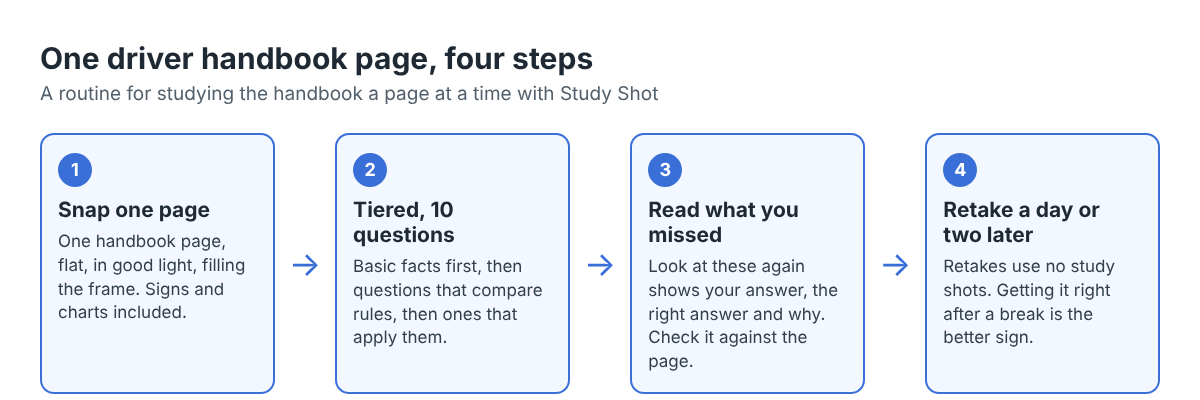
- Read one handbook page. Then make a Tiered quiz of 10 questions from it.
- Go through Look at these again. For each miss, find the line on the page before you move on.
- The next day or the one after, retake that quiz before you start a new page. Retakes use no study shots, and your library keeps every quiz with its page photo and your best score.
- Once a week, retake the quizzes not yet Mastered. The grades are Mastered from 90%, Good from 70%, Getting there from 50%, and Needs another try below that.
The level scores in your results point to the gap. A high basic score and a low advanced score on a page about giving way means you know the rule but not yet how to use it. How practice questions show what you do not know yet explains how to read those gaps.
Frequently asked questions
Can I use a page of road sign pictures?
Yes. Study Shot reads the words, labels and diagrams on a page, not only running text. Keep the page flat and fill the frame so each sign is sharp.
Will the questions match my official theory test?
They come from the handbook page you photograph, so they cover your rules as the page states them. They are not official test questions, and they can contain mistakes, so check the explanations against the handbook.
Can I get the questions in another language?
Yes. Quizzes come in 50 languages, and Study Shot reads the page in the language it is written in, then writes the quiz in the language you pick. The app's own screens stay in English.
Can a friend learning to drive take my quiz?
Yes. Press Share this quiz to make a link. Your friend needs a Study Shot account and gets their own copy of the questions, without your photo.
Get started
Pick the handbook section you find hardest, read one page and photograph it. Make a 10-question Tiered quiz, check each explanation against the page, and retake it in a day or two.
Try Study Shot: it is free to start. Photograph the page you are studying tonight and get practice questions on it, from basic to advanced, with every answer explained.