How Accurate Are AI-Written Practice Questions? What to Know
AI practice questions can contain mistakes. Learn the kinds of errors to look for, a five-step check against your own page, and how to report a bad question.
How accurate are AI-written practice questions? There is no honest single number. An AI model can write a clear, useful question in seconds, and it can also write one with a wrong answer or a fuzzy wording. If you know the kinds of mistakes to look for, you can catch them fast and still get the benefit of practice. This post covers what goes wrong, a five-step check you can do against your own page, and what to do when a question is wrong.
How accurate are AI-written practice questions, really?
We will not give you a percentage, because any figure we made up would mislead you. What can be said is this: AI-written questions can contain mistakes, and Study Shot says so in its own facts. Treat every question as a draft written by a fast helper who sometimes slips.
That is not a reason to skip them. Answering a question from memory and then seeing the right answer is still useful practice. The point is to stay alert, and to check the answers you are about to memorize. If you want the research on why answering questions helps, read the testing effect explained for students.
Where AI-written practice questions go wrong
Mistakes tend to fall into a few groups. Knowing them tells you what to look for.
- Wrong key. The answer marked correct is not correct. This is the worst kind, because you may memorize it.
- Two defensible answers. More than one option could be argued for, but only one gets credit.
- No good answer. Every option has a flaw.
- Not on your page. The question asks about something your page does not cover, so the answer comes from somewhere else and may not match your course.
- Misread text. With a photo, a smudged number, a cut-off line or messy handwriting can be read wrongly.
- Vague wording. Words like "usually" or "best" leave room for argument.
These match the reasons Study Shot offers when you report a question: the marked answer is wrong, the question is unclear, or it is not on the page. We will come back to that below.
Why your own page is the best way to check
When a quiz comes from a page you photographed, you hold the source. You can flip back to the page and look for the line a question was based on. That is a check you cannot do with a quiz that came from nowhere.
Your textbook, your teacher's handout and your own notes are also the authority for your course. A general quiz may use a different definition or level of detail than your exam expects. So when a quiz and your page disagree, the page wins.
If you have not tried this approach, see how AI can make a quiz from a photo of your notes.
A 5-step check for any AI-written question
Use this when an answer surprises you, or when you are about to rely on a fact for a test. It takes about a minute per question.

- Find the source line. Go back to your page and locate the sentence the question is based on. If you cannot find one, the question may have wandered off the page.
- Cover the options and answer first. Then compare your answer to the options. If none match what the page says, the question may have no good answer.
- Test each wrong option. Ask why it is wrong. If you can defend two options, the question is unclear.
- Read the explanation against the page. The explanation should point to the same idea as your source. If it adds claims you cannot find on the page, be careful.
- Still doubtful? Ask a person. Ask your teacher, or look in your textbook. Do not settle a doubt by asking the same AI again.
A worked example: a question asks, "Where in a plant cell does photosynthesis take place?" and marks "In the chloroplasts" as correct. You check your biology page and find the line about chloroplasts. You then ask why each other option is wrong for that process: the mitochondria, the nucleus and the cell wall. Every wrong option fails, so you trust the question. If you had found a second option you could defend, that would be a reason to report it.
Red flags that a practice question is off
- The answer contradicts your page or your textbook.
- The question uses a term your course never used.
- Two options mean nearly the same thing.
- A number in the question does not match the number on your page.
- The explanation sounds confident but gives no reason.
- The question asks about something that is not on the photo at all.
- The photo was blurry or cropped, and the question touches the unclear part.
A blurry photo is the easiest red flag to prevent. Hold the page flat, fill the frame and keep the text sharp. The guide on taking a good photo of a page covers it step by step.
A habit that limits the damage from a wrong question
You do not need to verify every question. You need a habit that stops the few wrong ones from sticking.
- Treat your page as the final authority. If the quiz and the page disagree, the page wins, and you flag the question.
- Review your misses. A question you got wrong is the one worth checking against your source, both because you may have erred and because the question may have.
- Look twice at what you will memorize. Dates, formulas, definitions and numbers deserve a quick look.
- Add a second way of studying. After a quiz, explain a few ideas out loud in your own words, using your page. For more on the multiple-choice format, see why multiple-choice practice helps you learn.
- Work one page at a time. A single page is easy to check a question against. See how to study a whole chapter one page at a time.
What Study Shot gives you to check a question
Study Shot turns a photo of a page into a practice quiz. You photograph a page from a book, your notes or a whiteboard, and an AI model writes multiple-choice questions about it. Each question has four options and one right answer. The questions can contain mistakes, so the app has tools to check them:
- Explanations on every answer. After you press Check answer, you see whether you were right, the correct answer and a short explanation. It helps you check, but it does not replace your source.
- Show page. During a quiz you can bring up your photo and look at the source line right away.
- Look at these again. The results screen lists the questions you missed, with your answer and the right answer, so you know which ones to verify.
- Report a problem with this question. It sits under every question. You pick one of four reasons, add a note if you want, and send it to the Study Shot team. Reporting does not change your score.
- Refusals. If a photo is one it cannot write questions for, you get "We couldn't write questions for this photo. Try a different page." instead of a quiz.
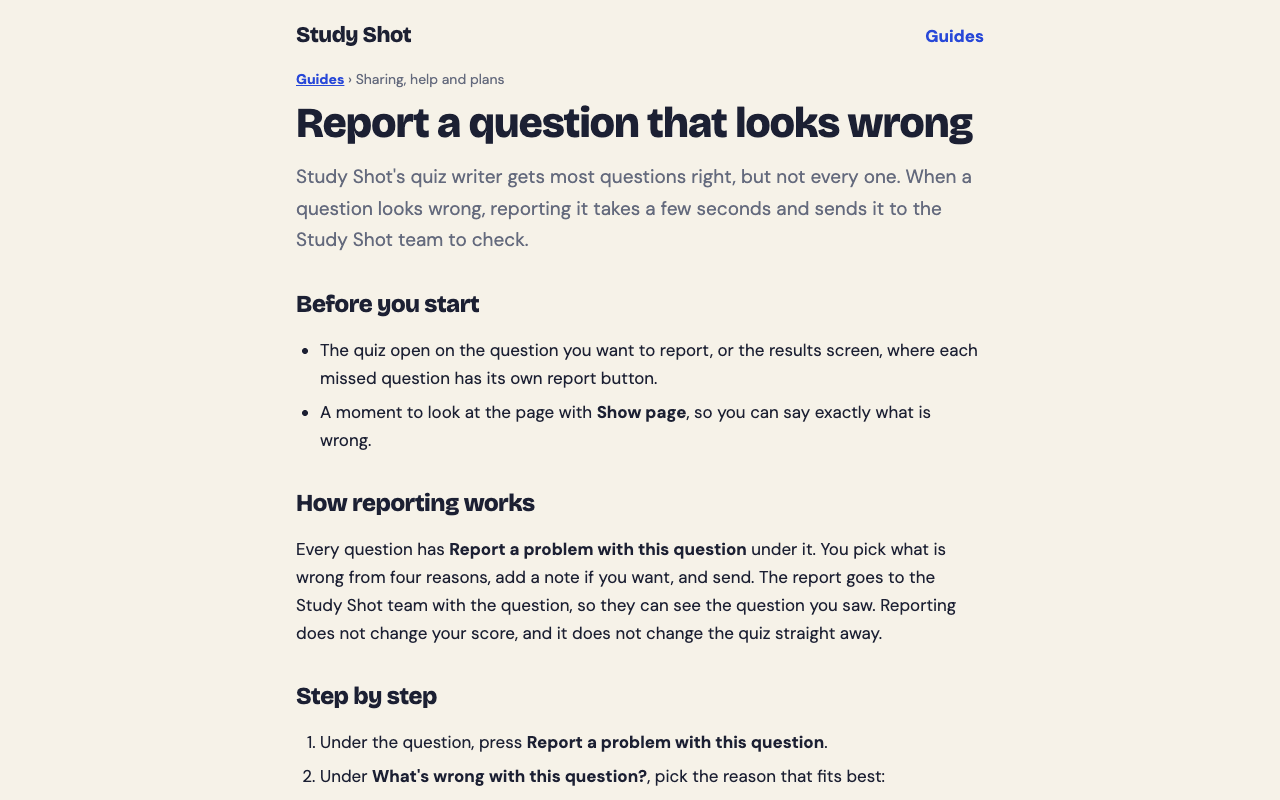
Before you report "the marked answer is wrong", read the explanation and look at your page with Show page, because the explanation can show a detail that is easy to miss. A short note with the right answer and where it is on the page makes the report easier to check. The guide to reporting a question has the steps.
You can also pick the level. Basic covers key terms, facts and definitions. Intermediate asks you to explain, compare and connect ideas. Advanced asks you to apply and predict in new situations. The guide to choosing a level and number of questions explains the options.
Frequently asked questions
How accurate are AI-written practice questions?
No one can promise they are always right. They can have a wrong key, two defensible answers or details that are not on your page, so check anything that surprises you against your source.
Are questions made from my own notes easier to check?
Yes. The source is in front of you, so you can find the line a question came from and compare it to the answer.
What should I do if I think a question is wrong?
Check it against your page and textbook first. In Study Shot, you can then use Report a problem with this question and choose one of four reasons.
Can a blurry photo cause wrong questions?
It can. Unclear text can be misread, so hold the page flat, fill the frame and retake the photo if any part is hard to read.
Should I rely on AI quizzes alone before an exam?
Use them as practice, not as your only source. Keep your textbook or notes as the final authority and review the questions you missed.
Get started
The best test of accuracy is your own page in front of you. Make a quiz, check one or two surprising answers against the source, and see how it feels. If you have a test coming, try the night before a test: a 30-minute practice routine.
Try Study Shot: it is free to start. Photograph the page you are studying tonight and get practice questions on it, from basic to advanced, with every answer explained.