How to Retake a Quiz Until You Master a Page
Retake a quiz until you master a page: a four-step loop of quiz, review misses, retake after a break and check the grade, with a worked example.
If you want to know how to retake a quiz until you master a page, the short answer is this: take the quiz, study only what you missed, then retake it and repeat until you can get every question right without guessing. This post walks through that routine using a single page and a Study Shot quiz, so you can follow it tonight.
How to retake a quiz until you master a page: why it works
A quiz asks you to answer from memory instead of looking at the page again. The research on that idea is called the testing effect, and The Testing Effect Explained for Students covers the one study it rests on. This post is about the practical side: what to do with the result.
A retake adds something rereading cannot. It shows you which ideas on the page you still miss, so you can spend your time there and not on what you already know.
What mastering a page actually means
Pick a clear target before you start. For one page, mastery means you can answer every question about it correctly, including the harder ones, and you can say why the wrong options are wrong.
Study Shot gives you a built-in scale. After each quiz it shows a percentage and a grade:
- Mastered: 90% and up
- Good: 70% and up
- Getting there: 50% and up
- Needs another try: below 50%
A good goal is Mastered on a quiz that includes advanced questions, not just Mastered on easy ones.
Step 1: Turn one page into a practice quiz
Start with one page, not a whole chapter. If you have many pages, see how to study a whole chapter one page at a time.
- Open Study Shot in your browser on your phone or computer and choose Make a new quiz.
- Choose Take photo or Choose photo. Hold the page flat and fill the frame.
- Pick 10 questions. That is the default.
- Pick the level Tiered. It splits the questions as evenly as possible across basic, intermediate and advanced, in that order.
- Press Create questions. It can take up to a minute.
Tiered is the best level for this routine. It gives you a score for each level, so a retake tells you whether your weak spot is the basics or the harder applied questions.
Step 2: Take the quiz and review every miss
Answer one question at a time. Pick an option and press Check answer. You see Correct! or Not quite., the right answer, and a short explanation of one to three sentences.
Do not rush past the explanations. They matter most on the questions you got wrong, and also on the ones you guessed. If you guessed and got lucky, treat it as a miss in your head.
Use Show page during the quiz to look at your photo when an explanation points to something you do not remember. Then compare the explanation with the page. Questions are written by an AI model and can contain mistakes, so the page is your check. If a question looks wrong, use Report a problem with this question.
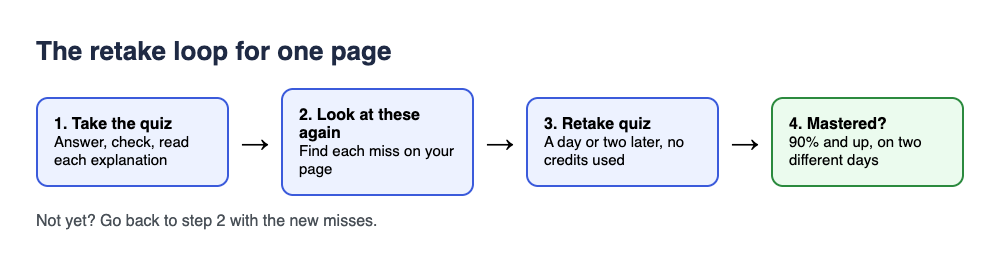
When you press Finish quiz, the results screen shows your score, your grade, and a right/total score for Basic, Intermediate and Advanced. Below that is a list called Look at these again. It shows each missed question with Your answer and Right answer.
Here is a worked example. Say you quiz a biology page on photosynthesis and score 6 of 10. Tiered splits the questions as evenly as possible across the three levels, so 10 questions come out near 4 basic, 3 intermediate and 3 advanced. The level scores might then read Basic 4/4, Intermediate 2/3, Advanced 0/3. That tells you the vocabulary is fine, but you struggle to apply it. Now you know what to study.
Step 3: Retake the quiz and focus on weak questions
Before you retake, spend five minutes with the Look at these again list. For each missed question, do three things:
- Find the answer on your page.
- Say the idea out loud in your own words.
- Write one line in your notes that you could use to answer a similar question.
Then press Retake quiz. Retaking uses no credits, so you can do it as often as you need. Your quiz stays in your library with its photo and your best score, ready to retake any time. The guide to results, library and retakes shows where everything is.
On the second attempt, watch which questions still trip you. Those are the ones that need a different approach, such as drawing the process or explaining it to someone else.
How many retakes is enough?
There is no magic number. Use your results instead:
- Score below 50%: go back to the page and read it properly before retaking.
- Score 50% to 89%: review your misses, then retake.
- Score 90% or more: you reached Mastered. Check that your Advanced score is strong too.
A sensible rule is to stop when you reach Mastered twice, on different days. The results guide says that getting a quiz right after a break is a much better sign that you have learned it than getting it right straight away.
A retake gives you the same questions again. After a few retakes you may start remembering which letter was right instead of the idea behind it. If that happens, make a fresh quiz from the same photo, which writes its own questions. Writing a new quiz uses credits from your monthly allowance, so use it when the retake has stopped telling you anything new.
Space your retakes so the page sticks
The results guide suggests retaking a quiz a day or two later, not just straight away. A simple schedule for one page:
- Day 1: take the quiz, review misses, retake once.
- Day 2: retake the quiz cold, without looking at the page first.
- A few days later: retake again. If you score Mastered, you are in good shape.
If a test is tomorrow, you cannot spread things out. Use the plan in the night before a test: a 30-minute practice routine instead.
Common mistakes when retaking quizzes
- Retaking right away without reviewing. Nothing has changed since the last attempt, so read the explanations first.
- Memorizing the letter, not the idea. If you only remember "B" for question 4, you do not yet know the topic. Ask yourself why the other three options are wrong.
- Counting lucky guesses as knowledge. Mark guesses as misses and study them.
- Ignoring the level scores. A good overall score can hide a weak Advanced score.
- Trusting every question blindly. The questions come from an AI model, so check doubtful ones against your page. Our post on how accurate AI-written practice questions are explains what to watch for.
Frequently asked questions
Does retaking a quiz in Study Shot use credits?
No. Taking a quiz, retaking it, and taking a quiz someone shared with you use no credits. Only writing a new quiz uses credits from your monthly allowance.
Where do I find my quiz to retake it?
Open your library. Each quiz card shows a thumbnail of your page photo and your best score, and you can open it and press Retake quiz.
What score counts as mastering a page?
Study Shot labels 90% and up as Mastered. A stronger test is reaching that grade on two different days, with a good Advanced score.
Can a friend try my quiz?
Yes. Use Share this quiz to make a link. Taking a shared quiz uses no credits. Your friend needs a Study Shot account and gets their own copy of the questions, without your photo.
Get started
Pick one page you need to learn this week, photograph it, and take your first quiz. Then review your misses and retake it until the grade reads Mastered. Try Study Shot: it is free to start. Photograph the page you are studying tonight and get practice questions on it, from basic to advanced, with every answer explained.